
The New Yorker
Condé Nast DigitalNews & Magazines
2.3482.00 Reviews
- Version
- 10.6.0
- Installs
- 500.00K
- Age Rating
- Everyone
Screenshots


Our Review of The New Yorker
 Analysis by Appyee
When I first stumbled upon The New Yorker app, I was curious to see how well it captured the essence of its iconic print counterpart. As someone who loves diving into in-depth articles and a bit of sophisticated humor, I was eager to explore all the app had to offer. Here's my take on it.
First Impressions
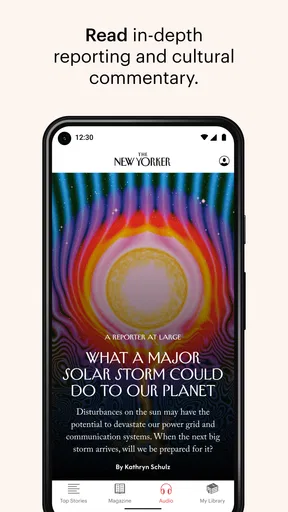
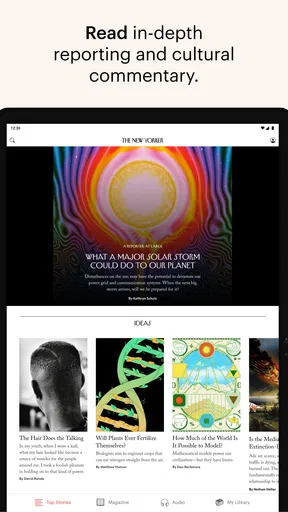
Opening the app feels like stepping into a literary haven. The design is sleek and minimalist, which gives the content room to breathe. Right off the bat, the homepage showcases a mix of the latest articles, featured pieces, and some intriguing cartoons. If you're a fan of The New Yorker, you'll appreciate how it maintains the magazine's classic aesthetic while introducing some modern touches.
Navigation and User Experience
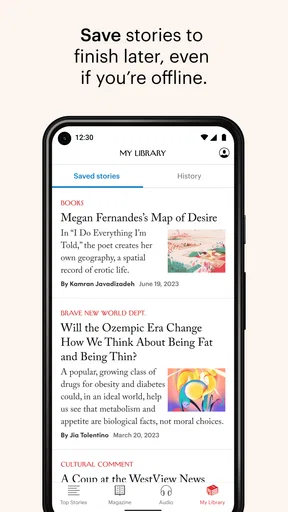
Getting around the app is a breeze. The bottom navigation bar is intuitive, letting you switch between sections like News, Culture, Books, and more. I found it easy to bookmark articles I wanted to revisit, and the search function works like a charm for when you're hunting for that one piece you heard about at brunch.
One thing I thoroughly enjoy is the reading experience itself. The text is crisp and the layout is easy on the eyes. You can adjust the font size, which is a godsend for those of us who might need a little extra help in the vision department. And let me tell you, reading the long-form articles on a lazy Sunday morning with a cup of coffee is pure bliss.
Content Variety
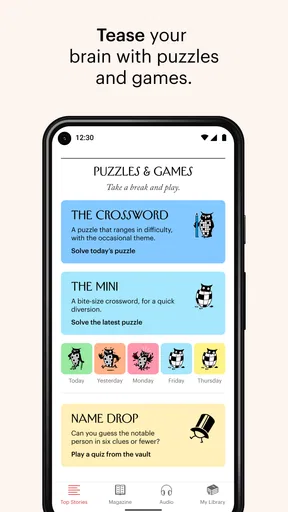
The New Yorker app doesn't skimp on content. Whether you're into investigative journalism, cultural commentary, or simply in the mood for a laugh with their renowned cartoons, the app has got you covered. The variety keeps it interesting, and there's always something new to discover each time you open the app.
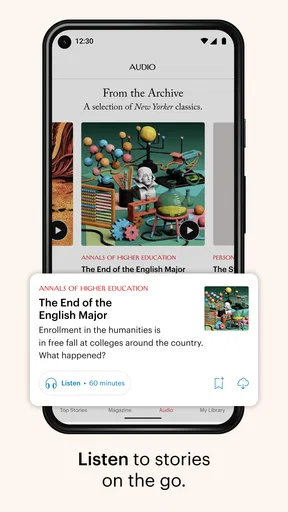
One feature I particularly love is the "Audio" section. Sometimes, when I'm on the go, I prefer listening to articles rather than reading them, and the app's audio feature is perfect for that. The narrators are engaging, making it easy to get lost in the story while commuting or doing chores.
Staying Updated
If you're someone who likes staying updated with the latest happenings, the app's notifications can be a handy tool. You can customize them to alert you about breaking news or new issues, which is great for keeping your finger on the pulse without being overwhelmed by constant pings.
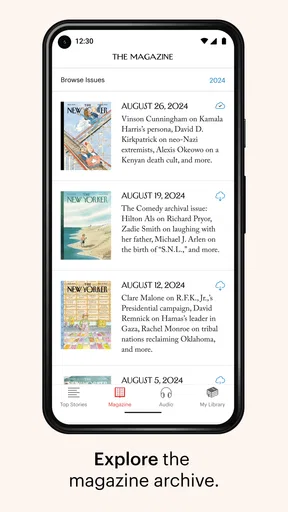
Additionally, the app offers a digital subscription that provides access to the magazine's archives. This is a treasure trove for anyone who's interested in exploring past issues or revisiting favorite articles. It's amazing how a piece written years ago can still resonate today.
Room for Improvement
While the app is a fantastic companion for any New Yorker enthusiast, there's always room for growth. Occasionally, I've noticed that the app can be a bit slow to load, especially when downloading new content. A bit of optimization in this area would enhance the overall experience.
Another thing that could be improved is the offline reading feature. Although you can download articles, I've encountered a few hiccups where some content didn't fully load when I was out of range. Fixing this would make the app even more reliable for travel or when you're in a spotty service area.
Who Will Get the Most from It?
I’d recommend this app to readers who want more than a quick headline scan: people who enjoy reported features, criticism, cultural writing, cartoons, and the particular mix of subjects associated with the magazine. It can also suit someone who already reads the print edition and wants a phone-friendly way to dip into articles between issues. The app is free to install, but access to magazine material may involve a subscription; in-app purchases range from $11.99 to $119.99 per item, so I’d check the purchase options carefully before committing.
It is less compelling if your main goal is to skim a broad selection of breaking headlines from many publishers in one place. A general news aggregator is better for that job, especially if you want to compare coverage quickly. The New Yorker’s strength is a more distinctive editorial voice and room for longer reads, not being a one-stop feed for every topic or source.
A Practical First Visit
For a first session, I’d avoid trying to explore every section at once. Open the home screen, pick one story that genuinely interests you, and use the adjustable text size before settling in. If a headline came up in conversation, try search rather than scrolling through the front page; bookmarking a worthwhile piece gives you a simple way to return when you have more time. That small routine turns the app from another stream to check into a reading shelf you can curate.
A realistic use is a quiet commute or a lunch break: choose a feature before leaving, then read it in a few focused minutes or listen to an available audio version while doing something that does not require your full attention. Audio is useful when your hands are occupied, but it is not a substitute for reading in every situation. If you need to revisit a detail, compare passages, or move through a particularly dense argument at your own pace, text is the better choice.
Subscriptions, Access, and Expectations
A first-time user may wonder whether installing the app means every article is immediately available. It does not: the app is free, while subscriptions and in-app purchases are part of the access picture. I’d browse first, see whether the mix and writing suit your habits, and then decide whether paid access makes sense. The listed age rating is Everyone, and the app is published by Condé Nast Digital.
The New Yorker is best treated as a publication with a digital reading experience, rather than as a free collection of unlimited stories. That distinction matters if you are comparing it with free news apps. If you only expect to open an article now and then, check what access is offered before assuming that a subscription will be worthwhile. If you regularly return for its reporting, essays, criticism, cartoons, and audio, a paid option may feel more useful than it would to an occasional visitor.
The archive can change how you use the app, too. Rather than treating it only as a daily news destination, search for a subject you have been following and use older pieces to add background or revisit an argument. This is especially useful when a current story raises questions that a quick update cannot answer. The trade-off is that an archive is most valuable when you have a topic in mind; it may feel less immediately rewarding if you only want a stream of fresh headlines.
Small Habits That Make It Work Better
Notifications are worth tailoring to your attention, not simply enabling by default. I’d keep alerts only if they help me notice the kinds of updates I actually want; otherwise, I would check the app when I have time to read. The publication’s longer pieces deserve attention, and frequent interruptions can turn that into hurried headline consumption. A saved article is a better fit for something interesting that I cannot finish right away.
For travel, I would prepare before losing a reliable connection. The app can be useful offline, but downloads have not always behaved perfectly in my experience, so I would open saved material while still connected and make sure it is ready before relying on it. That is a practical precaution rather than a guarantee of flawless offline access. If a piece is essential for a trip, keeping a backup reading plan is sensible.
There is also a useful difference between browsing by section and searching with a purpose. Sections help when I want to discover something unexpected; search is faster when I remember a subject or a story someone mentioned. Using both avoids the feeling that the homepage has to supply every reading choice. It also makes the app more helpful for readers who come in with one specific question rather than a desire to browse.
Room for Improvement
While the app is a fantastic companion for any New Yorker enthusiast, there's always room for growth. Occasionally, I've noticed that the app can be a bit slow to load, especially when downloading new content. A bit of optimization in this area would enhance the overall experience.
Another thing that could be improved is the offline reading feature. Although you can download articles, I've encountered a few hiccups where some content didn't fully load when I was out of range. Fixing this would make the app even more reliable for travel or when you're in a spotty service area.
How It Fits Among News Apps
Compared with a newspaper app built around a steady flow of short updates, this one encourages a slower, more deliberate kind of reading. Compared with reading the magazine in print, the phone makes search, adjustable text, bookmarks, and audio more convenient, though a screen does not have the same feel as turning through a physical issue. I would choose based on the moment: a broad aggregator for scanning several outlets, print for an uninterrupted magazine ritual, and this app when I want The New Yorker’s particular selection and formats in one place.
The app has a 2.3 average from around 1.4 thousand ratings, with roughly 455 written reviews, so I would not assume every reader has the same smooth experience I did. Its 500 thousand-plus installs show that it has found a substantial audience, but popularity alone does not settle whether it suits your routine. My own advice is to judge it by the parts you will actually use: reading comfort, the subjects you follow, and whether audio or saved stories make it easier to keep up.
Final Thoughts
Overall, The New Yorker app is a delightful way to engage with some of the most thoughtful and well-crafted journalism available today. It captures the essence of the magazine beautifully and offers a range of features that cater to different reading preferences.
For anyone who loves diving deep into stories, appreciates a good cartoon, or enjoys a well-narrated article, this app is worth checking out. It's a fantastic way to bring a slice of New York sophistication into your everyday life, no matter where you are.
It runs on Android 7.0 or later, and the current version is 9.4.0. I’d give it a try if you are curious about the magazine’s style, then make a decision based on whether you return for the reporting and features rather than the novelty of installing it. If you want fast, comprehensive coverage across many publications, choose a different news app; if you want thoughtful reading with a recognizable point of view, this is a more natural fit.
Verdict
Strengths of The New Yorker
- High-quality, in-depth articles.
- Diverse topics and perspectives.
- User-friendly interface.
- Offline reading available.
- Regular updates with fresh content.
Limitations of The New Yorker
- Requires subscription for full access.
- Occasional load time issues.
- No night mode option.
- Limited interactive features.
- High data usage for multimedia.
Similar Picks in This Category
View All
Google News - Daily Headlines
Google LLC4.0

X
X Corp.4.8

Flipboard:Your Social Magazine
Flipboard3.4

Opera News: breaking & local
Opera4.5

Hindi News by Dainik Bhaskar
Dainik Bhaskar Group4.0

Way2News Daily News App
Way2News ( Formerly Way2SMS )4.6
Frequently Asked Questions
What features does The New Yorker app offer?
The New Yorker app provides access to the magazine's trusted reporting, political commentary, cultural coverage, humor, and fiction. You can read full issues, access exclusive online content, and enjoy curated collections. The app also supports offline reading and offers a clean, user-friendly interface for easy navigation.
Is a subscription required to use The New Yorker app?
Yes, a subscription is necessary to access the full range of content within The New Yorker app. While some articles may be available for free, a subscription unlocks complete access to all issues, archives, and exclusive features. Subscription options are available on a monthly or annual basis.
Can I read articles offline in The New Yorker app?
Absolutely. The New Yorker app allows you to download articles and entire issues for offline reading. This feature is especially useful for users who want to enjoy content without an active internet connection, such as during travel or in areas with limited connectivity.
Does The New Yorker app have a search function?
Yes, the app includes a robust search function that allows users to find specific articles, authors, or topics quickly. This feature enhances the user experience by making it easier to locate desired content within the vast repository of The New Yorker’s archives and current issues.
How frequently is new content added to The New Yorker app?
New content is added to The New Yorker app weekly, coinciding with the magazine's publication schedule. In addition to regular issues, the app is continually updated with daily news, stories, and exclusive online content, ensuring users have access to the latest in-depth journalism and cultural insights.
